
Take hold of any window.
Hold two keys and move the pointer. The window follows — no clicking, no aiming at title bars or corners.
Request the ForjGrip 1.1 beta
Private beta — you'll be asked to sign in with an approved email address.
macOS 13 or later · Apple silicon and Intel · 348 KB · signed and notarized by Apple
Where it stands
Shipped and in daily use, handed out to testers rather than posted publicly while the last rough edges come off. Signed and notarized by Apple.
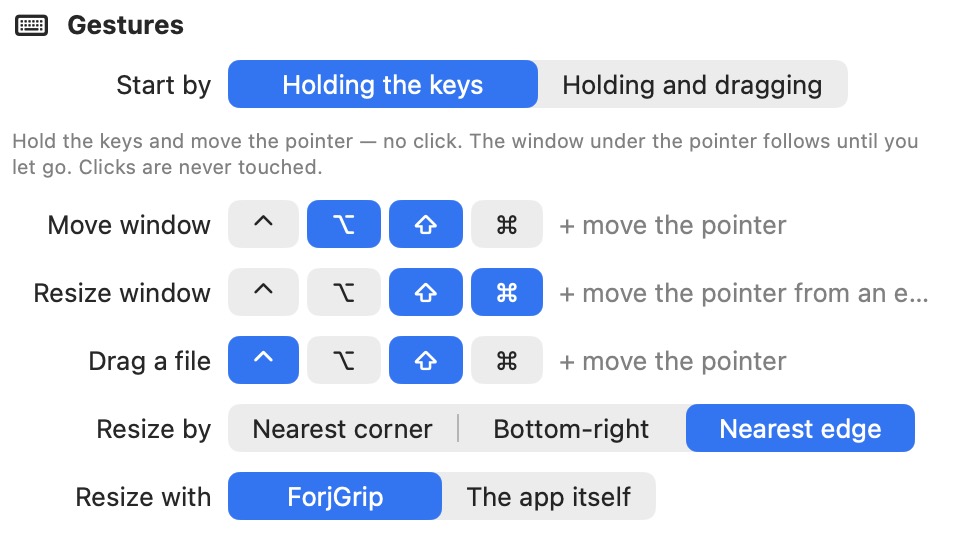 Every chord is yours to change. These are the defaults.
What it does
| ⇧ ⌥ | Move the window under the pointer. Just move the pointer — no click. |
| ⇧ ⌘ | Resize it. The corner nearest the pointer follows; the opposite corner stays put. |
| ⌃ ⇧ | Drag a file. Point at it, move, let go — a real drag, with drop targets and undo. |
| Double-click | With either window chord held, fills the screen. Again puts it back. |
And the small things
| Magnetism | Edges are drawn to the screen's edges and middle, and to other windows, so things line up without fiddling. |
| Hover to raise | Rest the pointer on a window and it comes forward. Off by default. |
| Per-app | Any app whose own shortcuts clash can be excluded, from the menu bar. |
| Off switch | One click in the menu bar stops everything. |
| Your keys | Every chord is yours to change. |
Why it exists
Zooom/2 did this for years and stopped working when Apple dropped Rosetta. ForjGrip is a native rebuild of the part that mattered: windows you can grab anywhere. It uses only public macOS APIs — nothing injected, nothing that needs System Integrity Protection turned off, nothing that breaks on the next macOS update.
Installing
Open the disk image and drag ForjGrip to Applications. On first launch it will ask for Accessibility permission, which is what lets any app move another app's windows: System Settings → Privacy & Security → Accessibility.
← All apps